Microsoft Dynamics 365 – HelloX Tech https://hellox.ca Streamlining Operations for SMBs Thu, 01 Jan 2026 05:03:52 +0000 en-US hourly 1 https://wordpress.org/?v=6.9.1 https://hellox.ca/wp-content/uploads/2025/02/HelloX_Logo--150x112.jpg Microsoft Dynamics 365 – HelloX Tech https://hellox.ca 32 32 How Power Apps Licenses Impact Dataverse Storage https://hellox.ca/how-power-apps-licenses-impact-dataverse-storage/ Thu, 17 Apr 2025 06:27:02 +0000 https://hellox.ca/?p=900

Organizations adopting Microsoft Power Platform often encounter storage limitations when attempting to create Production or Sandbox environments in Dataverse. This guide outlines how licensing directly affects Dataverse storage availability and how to plan capacity effectively.

Default Storage: Business Basic and Developer Plan

Users with Microsoft 365 Business Basic or without a Power Apps license may still create Developer environments through the Power Apps Developer Plan. However, these environments:

  • Are isolated for personal use
  • Are not intended for production
  • Do not contribute to tenant-wide capacity

According to Microsoft’s guidelines, Developer Plan environments offer:

Feature Limit
Database storage 2 GB
Flow runs per month 750

Despite the ability to build and test apps, Production or Sandbox environments cannot be created without additional licensed capacity.

Unlocking Storage with Power Apps Licenses

To create Dataverse environments beyond development purposes, organizations must assign Power Apps licenses. The following license tiers contribute storage at the tenant level:

Power Apps Per User (Premium)

  • Database Capacity: 10 GB base + 250 MB per license
  • File Capacity: 2 GB per license

Each tenant is granted a 10 GB base database capacity upon assigning the first Power Apps Premium (Per User) license. Additional licenses add 250 MB database and 2 GB file storage each.

Power Apps Per App

  • Database Capacity: 50 MB per license
  • File Capacity: 400 MB per license

This license type is ideal for narrowly scoped apps but contributes less storage than the Per User option.

Capacity Visibility

Administrators can view capacity allocation and usage via the Power Platform Admin Center under Capacity > Summary. Storage contributions are broken down by:

  • Org (tenant) default base allocation
  • User licenses (Per App and Per User)
  • Add-on storage purchases

This view helps guide environment creation and plan for future app deployments.

Summary Table: License-Based Storage Contribution

License Type Database Capacity File Capacity
Power Apps Per User 10 GB base + 250 MB/license 2 GB per license
Power Apps Per App 50 MB per license 400 MB per license

Best Practices

  • Start with a Per User license to unlock the initial 10 GB base storage.
  • Add Per App licenses for lightweight scenarios where limited storage is sufficient.
  • Monitor usage proactively through the Admin Center to avoid failed environment creation.
  • Purchase add-on storage when scaling apps across teams or business units.

Understanding how Power Platform licenses impact Dataverse capacity is critical for planning, governance, and ensuring successful deployment of business applications at scale.

📎 For official documentation, visit: https://learn.microsoft.com/en-us/power-platform/admin/capacity-storage
]]>
Understanding Microsoft Dataverse, Power Automate, and Integration Options for Your Business https://hellox.ca/understanding-microsoft-dataverse-power-automate-and-integration-options-for-your-business/ Sun, 13 Apr 2025 03:29:35 +0000 https://hellox.ca/?p=744

Table of Contents

At HelloX Tech Ltd., we often work with organizations who are new to Microsoft Dataverse and Power Automate, and are exploring how to connect their existing systems to the Microsoft ecosystem. Whether you’re using in-house databases, legacy applications, or third-party cloud services, this article gives you a high-level overview of what’s possible—and how it can bring immediate value to your operations.

Below, we break down the essentials of Dataverse, Power Automate, and how integration works via APIs and custom connectors. 


1. 🧩 Microsoft Dataverse Web API

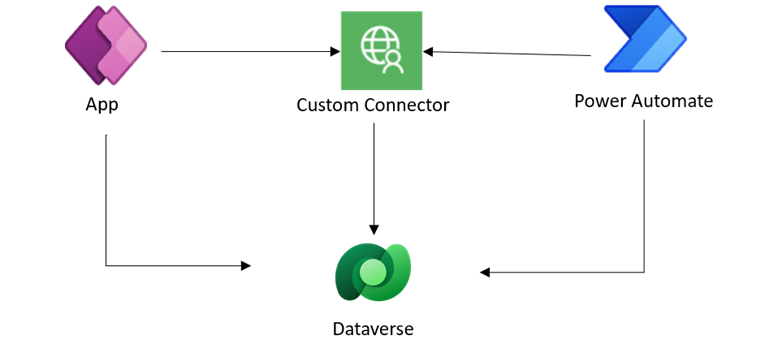
The Dataverse Web API is a RESTful service that allows external systems to securely access and manipulate Dataverse data using standard HTTP protocols.

With the Web API, your systems can:

    • Read or write data from/to Dataverse

    • Trigger business logic

    • Run queries and fetch related records

    • Perform operations similar to SQL (using OData syntax)

This is ideal for advanced integrations where direct, real-time communication with Dataverse is required.

➡ Use the Microsoft Dataverse Web API
➡ Full API Reference


2. ⚙ Power Automate

What is Power Automate?

Power Automate is Microsoft’s cloud-based automation platform that enables you to automate workflows across Microsoft 365 and hundreds of other applications without writing code.

You can use Power Automate to:

    • Automate repetitive tasks like sending emails or syncing data

    • Set up approval workflows (e.g., leave requests or budget sign-offs)

    • Trigger processes when records are created or updated in systems

    • Schedule jobs or run flows based on conditions (e.g., only on weekdays)

This tool is perfect for both business users and developers. It speeds up your processes, reduces manual effort, and increases accuracy.

➡ Explore Power Automate (official site)


Out-of-the-box connectors for third-party systems

Power Automate includes hundreds of pre-built connectors to widely used platforms such as:

    • Salesforce

    • SharePoint

    • Dropbox

    • SQL Server

    • SAP

    • Google Drive

    • Outlook

    • Twitter

    • Adobe PDF Services, and more

These out-of-the-box (OOB) connectors allow you to automate tasks across multiple apps with minimal setup—no need to build custom code for every connection.

➡ See the full list of connectors


Create Custom Connectors in Power Automate

If the system you’re working with doesn’t have a pre-built connector, Power Automate allows you to build a custom connector. These connectors are wrappers around any REST API you provide, giving your organization the flexibility to integrate nearly any web-based application into your flows.

You can define:

    • Authentication methods (OAuth2, API keys, etc.)

    • Request parameters and response handling

    • Actions and triggers that will be available inside Power Automate

➡ Custom connectors overview
➡ Create a custom connector from scratch


3. 🗃 Microsoft Dataverse

What is Dataverse—and why is it special?

Microsoft Dataverse is the secure, scalable data platform behind many Microsoft Power Platform applications (like Power Apps and Power Automate). Think of it as a cloud database built for business apps, complete with relational data modeling, field validation, role-based access, and auditing.

Key benefits:

    • Deep integration with Microsoft 365 and Dynamics 365

    • Tables, relationships, calculated fields, file storage

    • Supports plug-ins, business rules, and automated flows

    • Designed for both citizen developers and professional developers

If you’re building internal tools or portals that need structured, secure, and scalable data storage, Dataverse is the platform to explore.

➡ What is Microsoft Dataverse?


Role-based security controls

Dataverse includes a robust security model that ensures data is only accessible to the right people. You can configure:

    • Security roles: Define who can create, read, update, or delete records

    • Team-based access: Share permissions across functional groups

    • Row-level and field-level security: Hide sensitive data from unauthorized users

    • Environment-level isolation: Control access across development, test, and production environments

This makes Dataverse a good fit for organizations with privacy, compliance, or internal governance requirements.

➡ Dataverse Security Roles & Privileges


👋 Final Thoughts

Even if your organization is just starting with Microsoft’s Power Platform, these tools are powerful enablers of digital transformation. You don’t need to overhaul your existing systems—just connect them using APIs, Power Automate, or custom connectors and let Dataverse manage your data with enterprise-grade control.

If you’d like help setting up your first flow or exploring integration options, feel free to contact us at HelloX Tech Ltd. We’re happy to help!

]]>
Maximizing Efficiency with Microsoft Dynamics 365: A Practical Guide for SMBs https://hellox.ca/maximizing-efficiency-with-microsoft-dynamics-365-a-practical-guide-for-smbs/ Mon, 24 Feb 2025 09:08:16 +0000 https://hellox.ca/maximizing-efficiency-with-microsoft-dynamics-365-a-practical-guide-for-smbs/

In today’s fast-paced digital landscape, small and mid-sized businesses (SMBs) are constantly looking for ways to do more with less. Whether it’s optimizing customer interactions, automating workflows, or gaining visibility into sales pipelines, Microsoft Dynamics 365 offers a unified platform to help SMBs boost productivity and streamline operations.

This article explores how Dynamics 365 can empower SMBs across various functions and provides practical guidance on where to start.


Why Dynamics 365 for SMBs?

Microsoft Dynamics 365 combines CRM and ERP capabilities into applications that work seamlessly together. Designed with flexibility and scalability in mind, it enables SMBs to:

  • Centralize customer data for improved service and retention.

  • Automate routine processes to reduce manual effort and human error.

  • Access real-time insights through embedded Power BI reports and dashboards.

  • Scale as you grow, adding functionality as business needs evolve.

  • Integrate with familiar tools like Outlook, Excel, Teams, and SharePoint.


Key Areas of Efficiency Gains

1. Sales and Customer Relationship Management

With Dynamics 365 Sales, your team can:

  • Track leads, opportunities, and accounts in one place.

  • Get AI-driven insights to focus on the most promising deals.

  • Automate follow-ups and reminders to never miss a touchpoint.

2. Customer Service

Using Dynamics 365 Customer Service, SMBs can:

  • Create a self-service knowledge base for clients.

  • Manage service cases and escalations more efficiently.

  • Offer omnichannel support through email, chat, and more.

3. Field Service and Project Operations

For businesses managing onsite service or client projects:

  • Dynamics 365 Field Service ensures optimal resource scheduling and tracking.

  • Project Operations offers visibility into project timelines, budgets, and team performance.

4. Finance and Invoicing

SMBs can simplify financial operations with:

  • Business Central (D365 ERP) for managing invoicing, expenses, purchasing, and inventory.

  • Integration with Power Automate to extract and process financial data automatically.


Power Automate: Your Secret Weapon


Power Automate is Microsoft’s low-code automation tool that connects with hundreds of services, including Dynamics 365 and third-party platforms like Gmail, Slack, Shopify, and QuickBooks.


What Power Automate can do:


  • Trigger workflows based on events in Dynamics (e.g., when a new lead is created).

  • Sync data between different systems automatically.

  • Send notifications, create tasks, or generate documents without manual work.

You can also create Custom Connectors to extend integration with niche tools or in-house applications.


Dataverse: The Core of Your Data Strategy


Microsoft Dataverse is the secure data platform behind Dynamics 365. It offers:

  • Unified data storage for all D365 and Power Platform apps.

  • Granular security control using role-based access.

  • Relational database capabilities, business rules, and logic without writing code.

Dataverse helps you maintain data integrity, accessibility, and compliance—all essential for SMBs in regulated industries.


Practical Tips for Getting Started


  1. Define business goals – Start with a clear outcome (e.g., “automate quote-to-invoice process”).

  2. Start small – Use a phased rollout to avoid overwhelming your team.

  3. Leverage out-of-the-box templates – Many Dynamics and Power Automate templates are available to jumpstart your journey.

  4. Train your team – Adoption is key; provide hands-on learning and real-world examples.

  5. Consider a partner – Work with a Dynamics 365 consultant to customize your setup and accelerate ROI.


Conclusion


With the right strategy, Microsoft Dynamics 365 can become a game-changing asset for your business. From sales to operations, finance to customer service, it equips SMBs with tools to grow efficiently and compete at scale.

Whether you’re just starting or looking to expand your digital capabilities, HelloX Tech is here to guide you every step of the way. Contact us today for a personalized demo or consultation.

]]>
How to Choose the Right Microsoft Dynamics 365 Solution for Your Business https://hellox.ca/how-to-choose-the-right-microsoft-dynamics-365-solution-for-your-business/ Mon, 24 Feb 2025 09:08:16 +0000 https://hellox.ca/how-to-choose-the-right-microsoft-dynamics-365-solution-for-your-business/

Table of Contents

Choosing the right business application is a crucial step in your company’s digital transformation. With Microsoft Dynamics 365, you gain access to a suite of powerful tools designed to manage sales, service, operations, finance, HR, and more. But with so many modules available, how do you choose the right one(s) for your business?

In this guide, we break down the core Dynamics 365 apps, who they’re for, and how to decide what best fits your needs.


What is Microsoft Dynamics 365?

Microsoft Dynamics 365 is a collection of intelligent business applications that unify customer data, automate business processes, and deliver insights. Each module focuses on a specific area of your business and integrates seamlessly with others when needed.

Whether you’re a small startup or a growing enterprise, Dynamics 365 offers flexibility to adopt what you need now and expand later.


Step-by-Step: How to Choose the Right Solution

 
1. Assess Your Business Needs

Start by identifying pain points or goals in areas like:

  • Customer relationship management (CRM)

  • Field service or onsite work

  • Financial operations and reporting

  • Inventory, purchasing, or fulfillment

  • Project-based service delivery

  • Human resources and recruiting

Example: If your sales team struggles with lead tracking and customer follow-ups, Dynamics 365 Sales may be your starting point.


2. Understand the Core Modules

Here are some of the most commonly used Dynamics 365 apps:

App
Best For
Highlights
SalesB2B/B2C sales teamsTrack leads, opportunities, pipelines, automate follow-ups
Customer ServiceSupport teamsManage cases, SLAs, knowledge base, omnichannel engagement
Field ServiceTechnicians & dispatchersSchedule resources, manage work orders, use mobile tools
Business CentralSMBs needing ERPFinance, inventory, purchasing, sales, reporting
Project OperationsProject-based servicesQuotes, timelines, budgets, resource planning
MarketingMarketing teamsCustomer journeys, email campaigns, lead nurturing
Human ResourcesHR departments

Benefits, leave, performance management, hiring

If you only need CRM or ERP now, you can start with a single module and grow into others as needed.


3. Consider Industry-Specific Needs

Some industries have unique requirements:

  • Auto repair shops may need Field Service, Customer Service, and integration with booking/invoice systems.

  • Educational organizations may benefit from Sales, Marketing, and Portals for student engagement.

  • Nonprofits may use Fundraising & Engagement solutions built on Dynamics.

A trusted Dynamics 365 Partner, like HelloX Tech, can help customize industry solutions or extend capabilities with Power Platform.


4. Leverage Power Platform

Sometimes, a standard Dynamics module is too much or not quite enough. That’s where Power Platform comes in:

  • Power Apps: Build custom apps quickly.

  • Power Automate: Automate tasks like notifications, data sync, or approvals.

  • Power BI: Visualize data and build dashboards.

  • Dataverse: Store data securely and connect everything together.

You can also create portals, mobile apps, and bots—all integrated with Dynamics.


5. Plan for Integration and Scalability

Ask:

  • Do I need to connect with QuickBooks, Outlook, SharePoint, or other tools?

  • Will I need to scale to multiple departments or regions later?

  • How important is mobile access or offline capability?

With Dynamics 365, you can start simple and scale up—without needing to switch platforms later.


Final Tips
  • Start with one or two apps that solve your most urgent problems.

  • Choose modular licensing—pay only for what you use.

  • Engage users early to ensure adoption.

  • Work with an expert to tailor the system to your business processes.


Let’s Find Your Fit

At HelloX Tech, we specialize in helping Canadian SMBs evaluate, implement, and scale Microsoft Dynamics 365. We’ll work closely with you to understand your business, recommend the right apps, and deliver results—on time and on budget.

Ready to choose your solution? Contact us today for a free consultation or system demo.

]]>